Pixela | Record and Track your habits or effort. All by API.
Pixela, Record and Track your habits or effort. All by API. | Pixela is the API service. With this service, you can get a GitHub like graph that expresses the degree of your daily various activities on a basis with a vivid gradation. All operations are per
pixe.la
http request 란 ?
서버와 클라이언트가 데이터를 주고받기 위한 방식
- get : 데이터를 가져올때 사용
- post : 서버에 새로운 데이터를 생성할 때 사용
- put : 기존 데이터를 전체 수정할 때 사용
- patch : 기존 데이터의 일부를 수정할 때 사용
- delete : 서버의 데이터를 삭제할 때 사용
사용자 생성
import requests
from datetime import datetime

USERNAME = "[계정이름]" # 임의로 생성 - 중복 x
TOKEN = "[토큰이름]" # 임의로 생성
GRAPH = "graph"
pixcela_endpoint = "https://pixe.la/v1/users"

user_para = {
    "token": TOKEN,
    "username": USERNAME,
    "agreeTermsOfService": "yes",
    "notMinor" : "yes"
}

# 생성
response = requests.post(url=pixcela_endpoint, json=user_para)
print(response.text)
http 헤더란 ?
http 요청 또는 응답에서 추가적인 정보를 전달하기 위한 부분
- 클라이언트와 서버 정보 제공
- 보안 및 인증 (인증 토큰, api키 등)
- 데이터 형식 지정
- 캐싱 정보 전달
그래프 생성
import requests
from datetime import datetime

USERNAME = "[사용자명]"
TOKEN = "[토큰]"
GRAPH = "graph"
pixcela_endpoint = "https://pixe.la/v1/users"

# 그래프 설정
graph_endpoint = f"{pixcela_endpoint}/{USERNAME}/graphs"

graph_para = {
    "id" : GRAPH,
    "name" : "enjoy",
    "unit" : "min",
    "type" : "int",
    "color" : "kuro",
}

headers = {
    "X-USER-TOKEN" : TOKEN
}
response = requests.post(url=graph_endpoint, json= graph_para, headers= headers)
print(response.text)
픽셀 등록 (해빗 등록)
import requests
from datetime import datetime

USERNAME = "[사용자명]"
TOKEN = "[토큰]"
GRAPH = "graph"
pixcela_endpoint = "https://pixe.la/v1/users"


# 그래프 설정
graph_endpoint = f"{pixcela_endpoint}/{USERNAME}/graphs"

headers = {
    "X-USER-TOKEN" : TOKEN
}

pixel_endpoint = f"{pixcela_endpoint}/{USERNAME}/graphs/{GRAPH}"
today = datetime.now().strftime("%Y%m%d")

pixel_para = {
    "date" : today,
    "quantity" : "240"
}

response = requests.post(url=pixel_endpoint, json=pixel_para, headers= headers)
print(response.text)
픽셀 변경
import requests
from datetime import datetime

USERNAME = "[사용자명]"
TOKEN = "[토큰]"
GRAPH = "graph"
pixcela_endpoint = "https://pixe.la/v1/users"


# 그래프 설정
graph_endpoint = f"{pixcela_endpoint}/{USERNAME}/graphs"


headers = {
    "X-USER-TOKEN" : TOKEN
}

pixel_endpoint = f"{pixcela_endpoint}/{USERNAME}/graphs/{GRAPH}"
today = datetime.now().strftime("%Y%m%d")

update_px_endpoint = f"{pixel_endpoint}/{today}"

px_up_para = {
    "quantity" : "300"
}

# 변경
response = requests.put(url=update_px_endpoint, json=px_up_para, headers=headers)
print(response.text)
픽셀 삭제
import requests
from datetime import datetime

USERNAME = "[사용자명]"
TOKEN = "[토큰]"
GRAPH = "graph"
pixcela_endpoint = "https://pixe.la/v1/users"

headers = {
    "X-USER-TOKEN" : TOKEN
}

pixel_endpoint = f"{pixcela_endpoint}/{USERNAME}/graphs/{GRAPH}"

today = datetime.now().strftime("%Y%m%d")

update_px_endpoint = f"{pixel_endpoint}/{today}"

# 삭제
response = requests.delete(url=update_px_endpoint, headers=headers)
print(response.text)
등록된 픽셀 확인
https://pixe.la/v1/users/{유저명}/graphs/{그래프명}.html
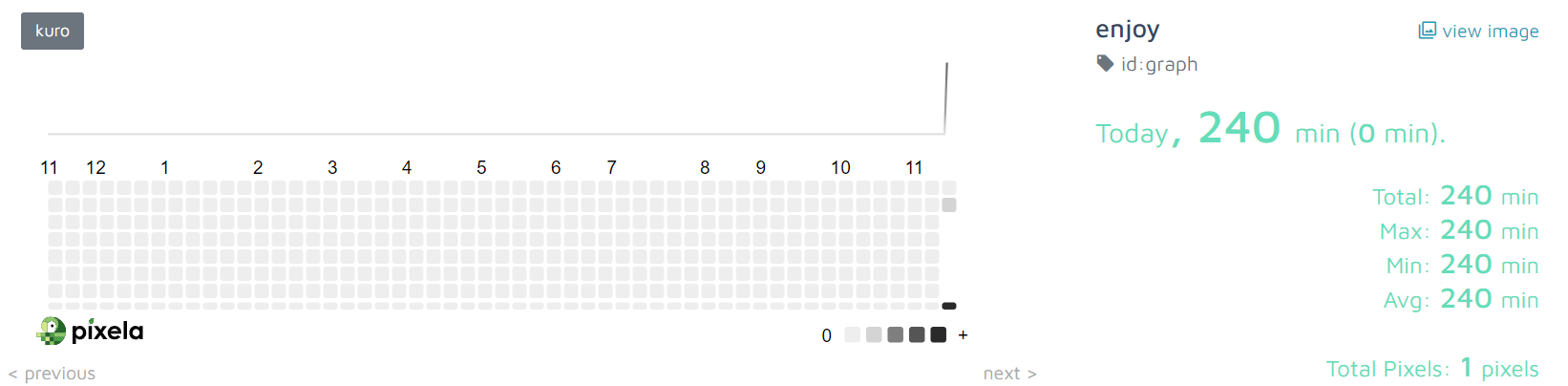
미약하지만 오늘 하루가 찍힌것을 확인 가능
'Python 🎧' 카테고리의 다른 글
| [python] 병아리의 파이썬 웹스크래핑 사용법 - request/beautifulsoup (2) | 2024.11.17 |
|---|---|
| [python] 파이썬 환경변수 설정하여 불러오기 - os (1) | 2024.11.03 |
| [python] 파이썬 타입 힌트 (3) | 2024.10.29 |
| [python/HTML] unescape 언이스케이핑 하는법 (2) | 2024.10.29 |
| [python] 파이썬 칸예 명언 어플리케이션 - API/requests/thinker (3) | 2024.10.28 |